Export invoice specifications published automatically from the ERP
A background process, a separate document database with version history and one link in the invoice that points to the new version after a correction.
- 0
- PDF files in the ERP database
- 1
- permanent link per invoice, whatever the corrections
- 5
- panel iterations with no downtime
- STATUS
- Production solution, maintained
- ROLE
- Architecture, implementation oversight, deployment, maintenance
- AREA
- ERP integrations · Document automation · SQL Server
Export invoices must be accompanied by a specification, a separate printout listing the document lines. The old solution stored the PDFs as binary attachments in the ERP database, used an outdated version of the vendor API, and after an invoice correction nobody could be sure which specification was current. I designed a solution that runs on its own, without an open user session, touches ERP data only through the official API and keeps version history.
- 01The production ERP database was growing with PDF binaries that did not belong there.
- 02Printing had to work without an ERP client and without a remote desktop, on a domain-managed service account.
- 03After an invoice correction the user had to land on the current specification without the link in the document changing.
- 04No writes straight into ERP tables, even when the API does not do what we would like.
Four components with clearly separated permissions.
- 01Background generator: a batch process run from Task Scheduler on a gMSA account. It finds export invoices with no specification or changed since the last publication and requests the printout through the official ERP API into an unattended PDF queue built on open-source components.
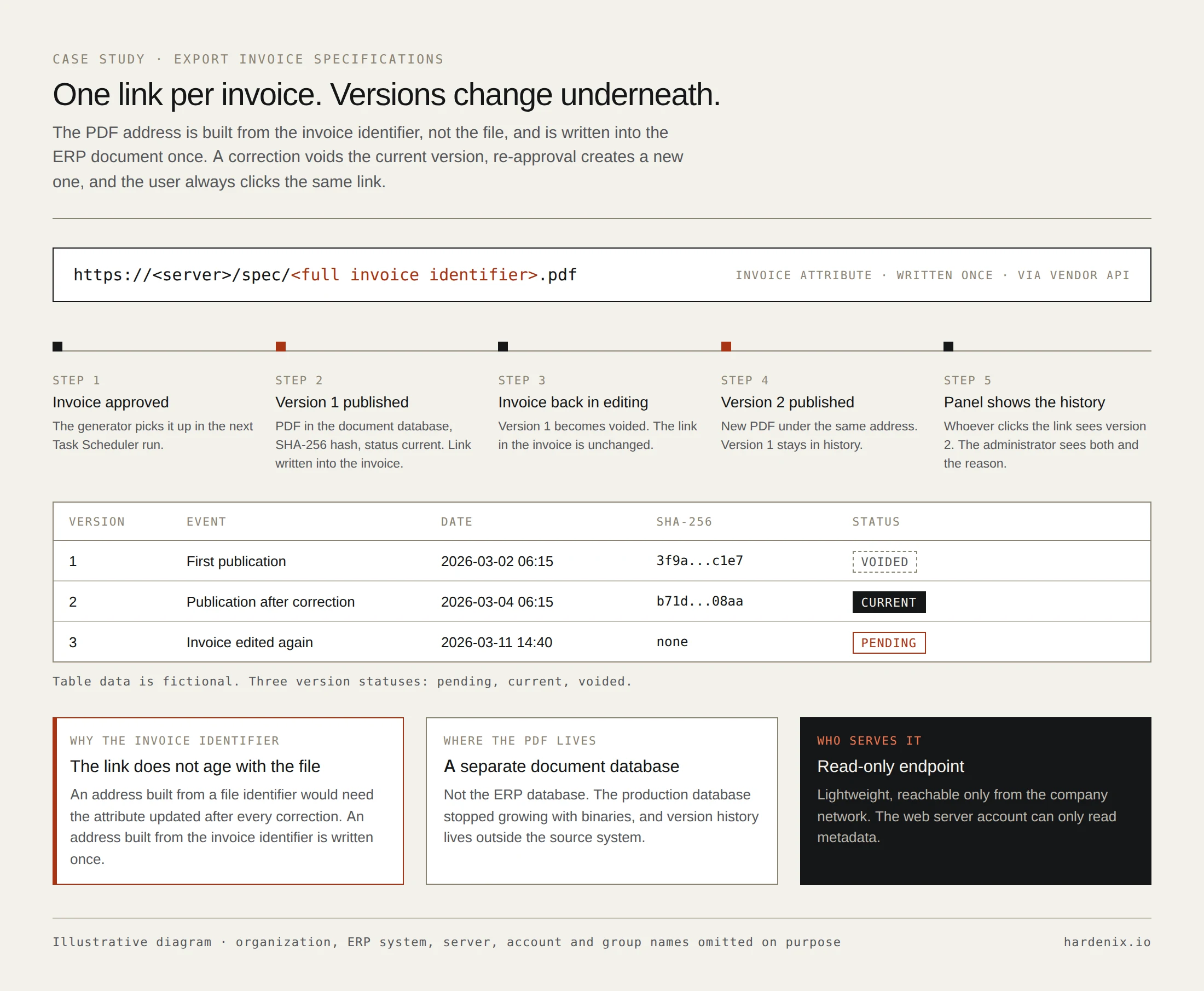
- 02Separate document store: the PDF goes only to a separate database. Each version has a SHA-256 hash and a status: pending, current, voided. When an invoice goes back into editing the current version is voided; re-approval creates a new one and the old ones stay in history.
- 03Permanent link in the document: the PDF address is built from the full invoice identifier, not a file identifier. It is written once into an invoice attribute, always through the vendor API. A separate read-only endpoint, reachable only from the company network, serves it.
- 04Admin panel: a Blazor application with domain login and roles from AD groups. Publication list, version history per invoice, generator runs with an event timeline, a publications chart by working day, and a system map of allowed and forbidden data flows. The panel only reads metadata; it has no access to PDF content, the ERP or Task Scheduler.
Zero direct writes to the ERP. Every change to a document goes through the vendor API.
A few days after launch the generator stopped publishing some invoices. The cause was neither the printout nor the document database. A legacy setting in the ERP configuration was adding an empty link attribute to new invoices. The generator correctly refused to overwrite a value it did not recognise, but did so too late and halted the whole run. I verified on the data and in a pilot that the official API does not update an existing empty value of this attribute type. Instead of working around it with a SQL write to ERP tables, I made three changes.
- 01The generator classifies the attribute state before printing and before saving a version.
- 02A faulty invoice gets a readable error event in the panel and does not block the others.
- 03The empty entries were removed in the official ERP client, and the setting that created them was switched off at the source.
- 01Least privilege: the web server account can only read metadata, the generator account can only call three publishing procedures, service account passwords are managed by the domain.
- 02Zero direct writes to the ERP: every document change goes through the vendor API.
- 03Every server change as a named script: preview first, then execution, automatic backup and rollback, SHA-256 verification of the package, and a separate read-only test after deployment.
- 04No secrets in the repository: connection configuration exists only locally on the server.
- 05The panel UI follows the company standard based on Fluent 2 (WCAG 2.2 AA, fully localised); visual regressions are guarded by screenshots and geometry tests.
- 01Every export invoice since the start of the year has an automatically published specification.
- 02The ERP database stopped growing with PDF binaries.
- 03The link in the document is permanent and always points to the current version.
- 04Administrators see in one place what was published, when, and why something failed.
- 05The panel went through five UI iterations with no downtime; every version keeps a copy for fast rollback.
.NET Framework 4.7.2 · .NET 10 · Blazor · C# · SQL Server · IIS · Windows Authentication · gMSA · Windows Task Scheduler · PowerShell 5.1 · Ghostscript
Anonymized material. The names of organizations, the ERP system, servers, accounts, groups, databases and attribute identifiers have been omitted. Data on the diagrams is fictional.